Sorinai vs Otter AI
Otter records the meeting and answers questions about it. Sorinai works with you during the call — on your side of it.
What Otter.ai does
Otter.ai is a standard meeting notetaker. It offers three ways to record a meeting. A bot can join the call for you, and can let itself into anything on your calendar whether or not you turn up, recording in your absence. A desktop app records your computer’s audio if you’d rather not put a bot in the call. And a mobile app records through your phone’s microphone, for the meetings that happen in the room.
With the bot in the call, you get a live transcript your teammates can read and comment on while it runs, and any deck someone shares gets screenshotted into the record. Otter AI Chat sits alongside it, so you can ask questions about a meeting during it or months afterwards. The Otter Meeting Agent goes further: speak to it mid-call and it answers as an attendee.
Who Otter is for
Otter works best across a large team. Everything lands in one archive that everybody can search. The bot covers the calls nobody remembered to record. The summaries arrive in Salesforce and Slack without anyone moving them.
It’s built so a company always knows what happened on its calls. Which is a different job from helping you get through one.
How Sorinai compares
Sorinai isn’t built for your company to keep a record on you. It’s built for you to get through the meeting you’re in.
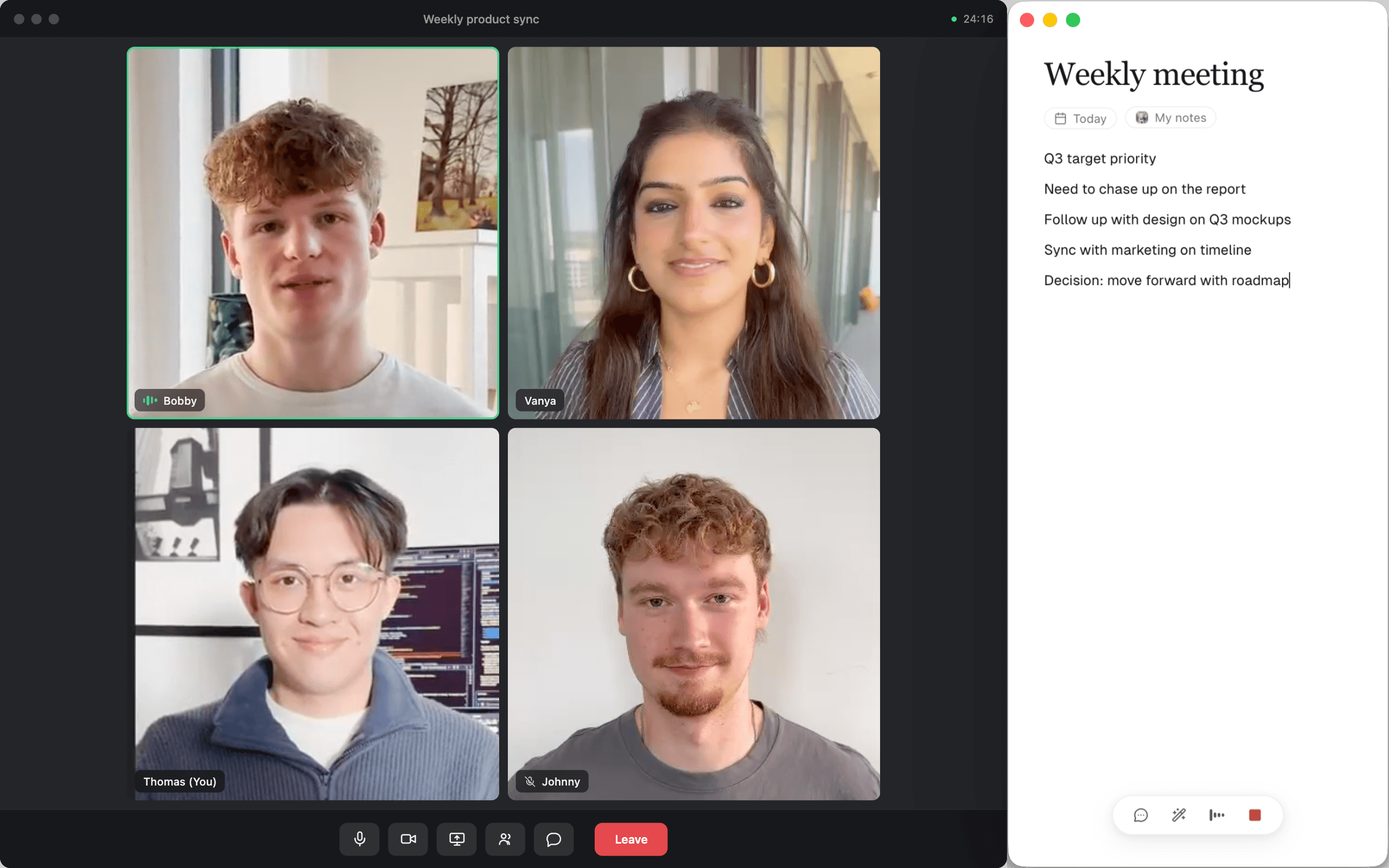
The notepad sits beside the call. Tell it to note something down and it writes straight into your notepad, or it can tidy up what you typed in a hurry and answer any questions you have.
“How do I respond to the objection they just raised?”
“Is the number they quoted anywhere near right?”
“What does that acronym everyone keeps using actually mean?”
The things everyone needs help with in the moment and nobody wants to ask out loud, all with just one click.
You stay in the conversation
Everyone has had the call where they stopped listening in order to write. You catch the number and miss the reason for it. You look up and the moment has moved on without you.
That’s the part Sorinai takes. You stay in the conversation and tell it what’s worth keeping as you go, and the note gets written while you’re still talking — into the page you’re already keeping, not a transcript you’ll have to mine afterwards. There’s nothing to catch up on, because nothing got missed in the first place.
It can also see what you’re looking at. The deck, the spreadsheet, the pricing table someone pasted thirty seconds ago and moved on from, you’ll never have to explain the topic of the meeting before you can ask about it. Sorinai can see what you see and hear what you hear, it understands what’s going on in real time.
And when you hang up, instead of generating a summary that you’ll have to read, it enhances and fills in what you already have written down. Your notes stay personal, your structure stays intact, just with more details you might’ve missed.
It fits the way you already work
Otter can push a summary into Salesforce, HubSpot or Slack, which helps if that’s where your work ends up.
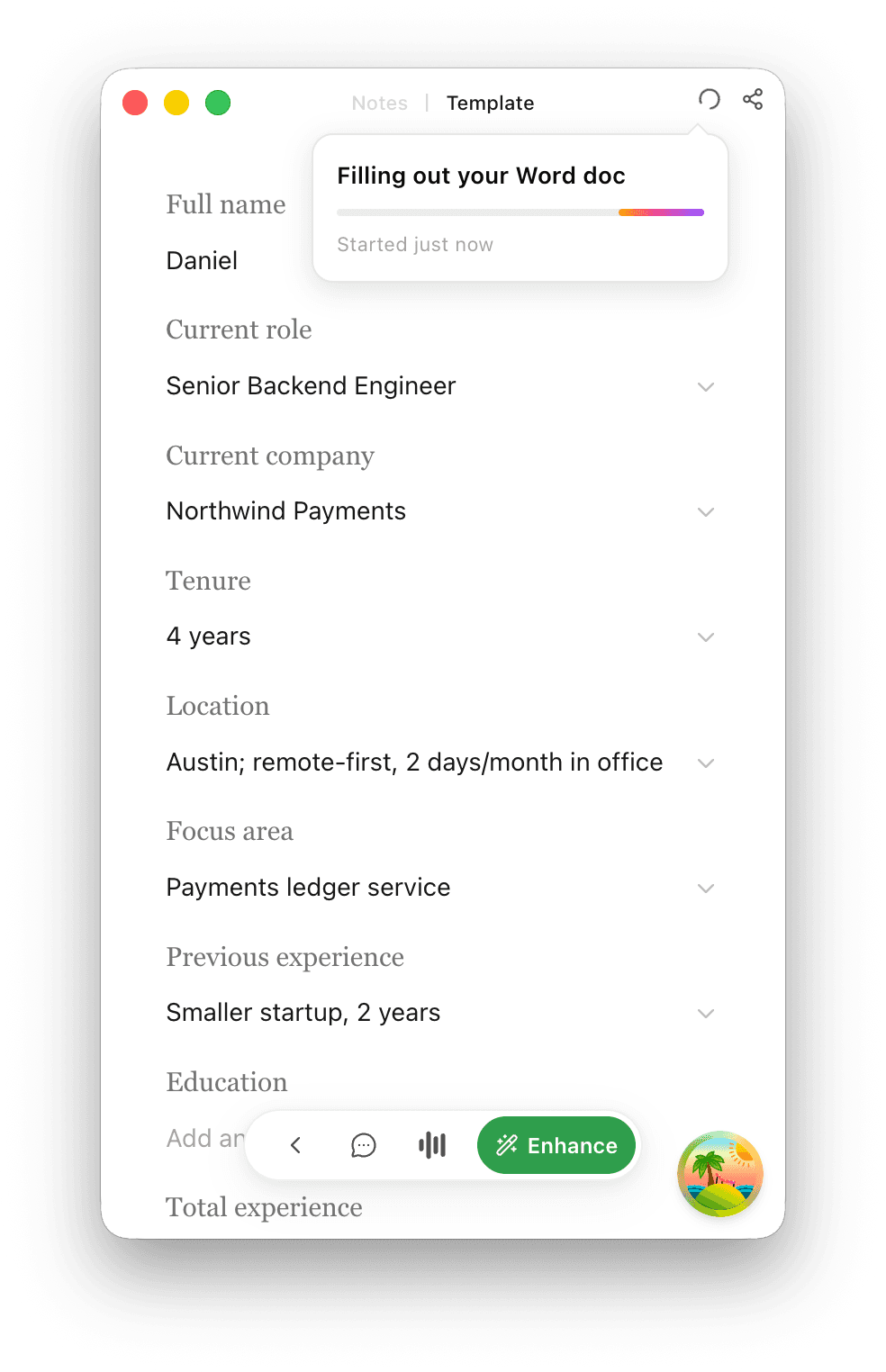
More often it ends up in a document — a form, a scorecard, the report you send after every call — and there is no integration for a Word file that lives on your desktop. So it gets copied across by hand, which is the job the notetaker was supposed to take off you.
Sorinai works on that file instead. Upload the one you already use, and it fills the fields in as the conversation reaches them, while you’re still on the call — so you can see what’s still blank while there’s time to ask.
When you hang up it’s ready to download, in the same format and layout you sent last time. Nothing to wire up, and no new system for anyone to learn.
Senior Backend Engineer — Screening Sheet
Technical
Compensation
Logistics
Recommendation
“Otter uses a proprietary method to de-identify user data before training our models.”
Your meetings aren’t training data
Nothing you record on Sorinai is used to train a model, and your transcripts and notes stay yours.
That matters more than it sounds. On any given call you might be naming a person and where they work, quoting a figure that isn’t yours to share, or walking through something covered by an NDA. Nobody on the other end of that call agreed to any of it.
The short version
 | Otter | |
|---|---|---|
| Private copilot only you can see | ||
| Answers from what's on your screen | ||
| Writes into your notes when you ask | ||
| Fills in your own Word or PDF template | ||
| Never trains AI on your content | ||
| Records without a bot | ||
| Mac and Windows | ||
| iPhone and Android apps | ||
| Live notes shared with participants | ||
| CRM and app integrations |
Every Otter column is taken from Otter’s own site and documentation, checked 7 August 2026. You can also put Sorinai side by side with Granola or Fathom.
Which one should you use?
Use Otter if
- You record away from your desk and need a phone app.
- Everyone in the call should see the notes being written and be able to comment on them.
- Summaries have to land in Salesforce, HubSpot or Slack without anyone moving them.
Use Sorinai if
- You want an assistant on your side of the call, not a record of it.
- Every call ends in the same document and you’re tired of rebuilding it out of a summary.
- The useful half of your meeting is on screen. A CV, a spreadsheet, a pricing table.
- What gets said on your calls should not end up in anyone’s training data.
Frequently asked questions
Otter’s runs in the open. You speak to the Meeting Agent as an attendee in the call, and AI Chat is a space Otter describes as teammates chatting together. Sorinai’s runs in a window only you can see, it can answer from what’s on your screen, and it writes into your notes when you ask. One helps the meeting, the other helps you.
Otter’s Notetaker joins Zoom, Google Meet and Microsoft Teams as a participant and can let itself in from your calendar, though their desktop app can also record without one. Sorinai never joins a call at all. It listens to your own computer, so nothing shows up in the participant list on any platform.
When you ask it to. There’s an eye beside the box you type into, and when it’s lit your question goes with one still picture of the screen you’re on — not your other monitors, and never Sorinai’s own window. No video, nothing running between questions, the picture is never saved, and one click turns it off. If you never grant screen permission it stays dark and the rest still works.
It will if you ask. Tell it what you want and it writes straight into your notepad, during the call or after it, and every edit it makes comes with an undo. Left alone it doesn’t: it enhances what you typed against what was actually said, and the words you typed yourself are kept separately and never overwritten. You end up with your notes, not a machine’s account of everything anyone said.
No. Your transcripts and notes are yours, and nothing is trained on them. Otter states on its own privacy page that it “uses a proprietary method to de-identify user data before training our models”.
No. Sorinai doesn’t meter recording on any plan, free included — no monthly minute pool and no per-meeting length cap. Otter meters both: 300 transcription minutes a month on free with a 30-minute limit per conversation, and 1,200 a month on Pro with a 90-minute limit per meeting.
Yes. Sorinai listens to your computer instead of joining your calls, so it doesn’t need to be the only tool in the meeting. Run both on the same call and see what each one leaves you with. Starter is free and needs no card.
It works with any call, because it listens to your device rather than connecting to a meeting platform. Zoom, Teams and Google Meet, but also phone calls, WhatsApp, FaceTime and a conversation happening in the room with you.
Yes, Mac and Windows both. There’s no phone app yet. If you need to record from your phone, Otter has iOS and Android.
Starter is free forever, with unlimited meetings and no card. Meetings older than 30 days need a paid plan to open again, though nothing is ever deleted and the last 30 days stay available on the free plan. Personal is $15 per user per month.