Sorinai vs Fathom AI
Fathom writes the meeting up afterwards, whilst Sorinai is with you both during and after your call
What Fathom does
Fathom is a meeting notetaker for Zoom, Google Meet and Microsoft Teams. It records the call, transcribes it, and produces a summary once the meeting is over.
On its new Mac desktop experience, Fathom also provides a live summary that updates during the call, which allows you to catch up on a thread you’ve lost, and a scratch pad to type notes into. That experience is still rolling out in phases and currently requires the latest Fathom desktop app on a Mac with English-language meetings; Windows support is listed as coming soon.
Complete summaries and transcripts are generated only after the meeting has ended and the capture has been processed.
How it helps you
The summary is built from a library of more than fifteen templates, including frameworks such as BANT, MEDDPICC and Sandler. Customising one, as Fathom documents it, means adding instructions on top of the chosen template rather than replacing it. Your meeting record stays inside Fathom; the only file Fathom itself hands you is the MP4 recording — transcripts and summaries are copy-to-clipboard only.
Action items carry a timestamp linking to that moment in the recording, and summaries sync to HubSpot or Salesforce. Once auto-share is enabled, the summary goes to everyone on the calendar invite, whether or not they attended.
How Sorinai differs
An AI notetaker that actually takes notes like how you would
A recorder wrapped in an LLM can only ever hand you the meeting back once it is over. By then the note you needed is a thing you have to go and find.
Say the word and Sorinai writes straight into the notepad you are already typing in — an empty page and it starts you off, a half-written one and the line slots into the right place.
So it works alongside you during the call rather than reporting on it afterwards. Your AI teammate in the meeting.
Northwind — Q3 renewal
It sees what you see
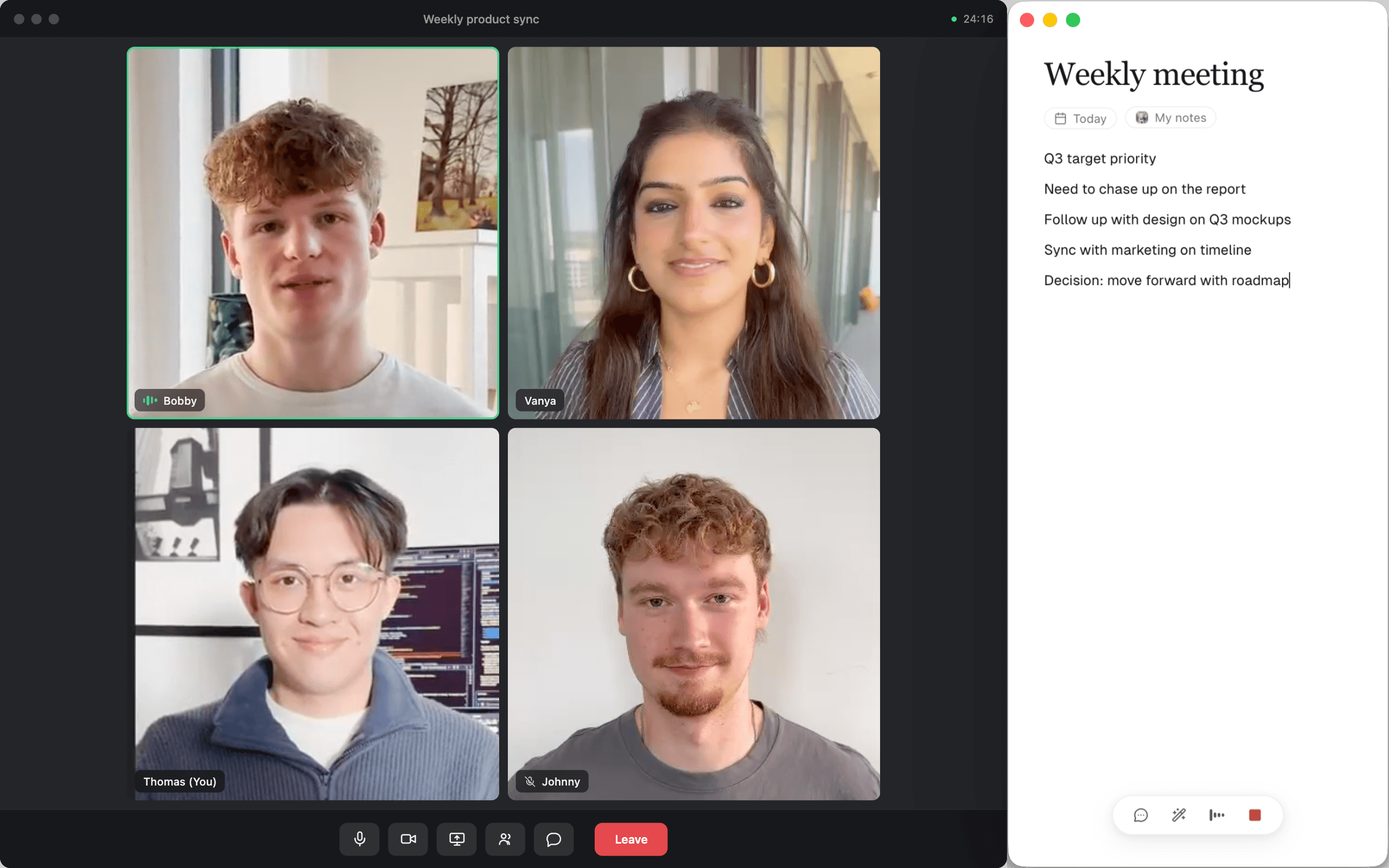
Half of most calls never gets said out loud. It’s the spreadsheet you’re both staring at, the deck you’re being walked through, the pricing table someone pasted thirty seconds ago and moved on from.
Sorinai can see your screen, what everyone is looking at during a meeting, which makes “what am I looking at here?” and “is that number right?” complete questions on their own.
You bring the document
Sorinai works on the document you were going to fill in anyway.
What you actually owe someone after a call is usually a file. A form, a scorecard, the report that goes out every time. There’s no integration for a Word document sitting on your desktop, so it gets rebuilt by hand out of whatever turned up afterwards — which is the job the notetaker was supposed to take off you.
And get it back filled in
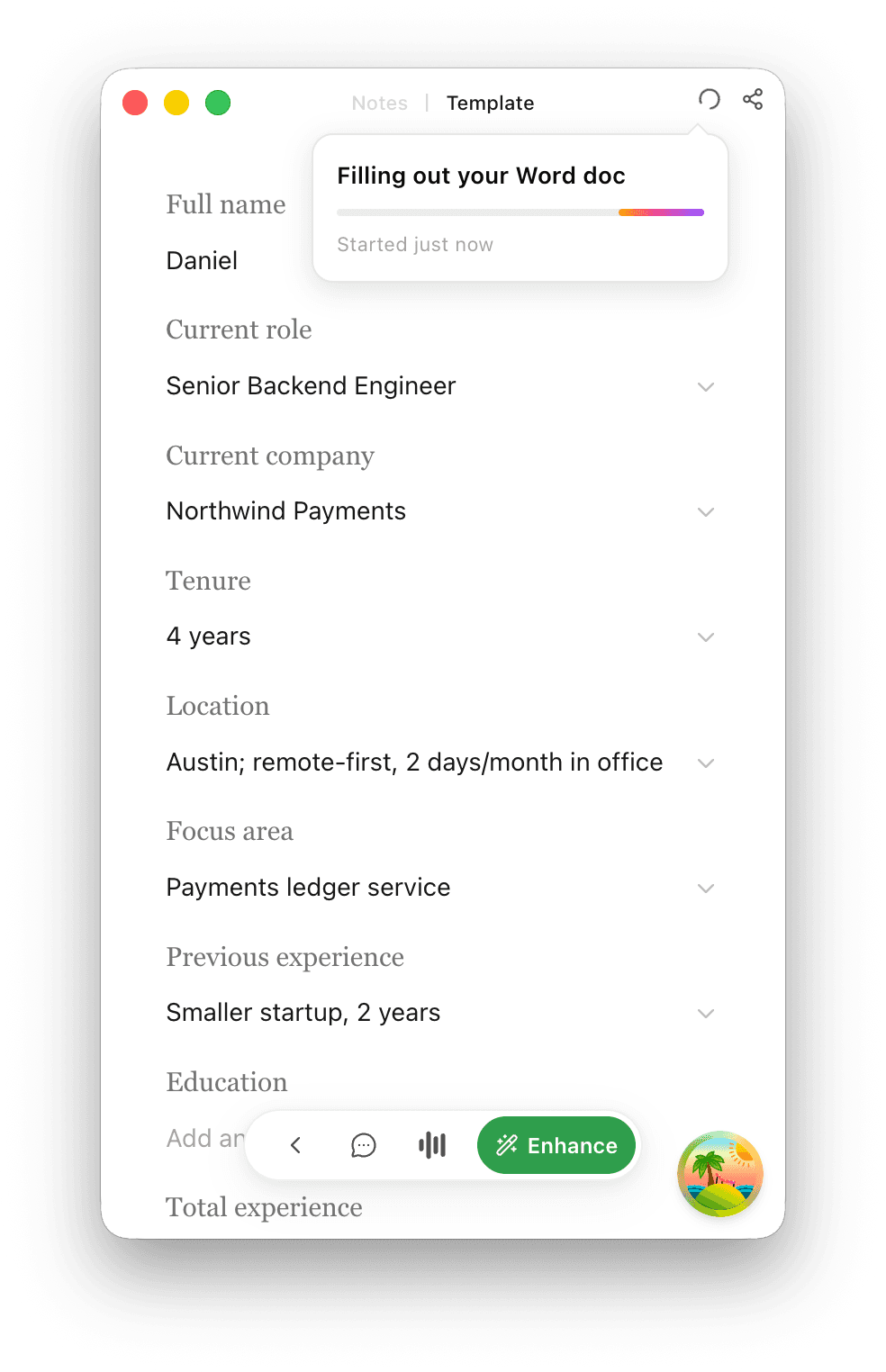
Upload the one you already use, and Sorinai fills the fields in as the conversation reaches them, while you’re still on the call — so you can see what’s still blank while there’s time to ask.
When you hang up it’s ready to download, in the same format and layout you sent last time. Your fields, your wording, your file. Nothing to wire up, and no new system for anyone to learn.
Senior Backend Engineer — Screening Sheet
Technical
Compensation
Logistics
Recommendation
Your notes stay yours
You write what you notice, in your words, and after the call Sorinai fills in around that. What you thought was worth writing down stays the point of the document — the words you typed are kept separately and never overwritten by anything.
You end up with your notes, not a machine’s account of everything that anyone said.
Weekly project sync
launch moved to june?
design waiting on final copy
sam send new timeline friday
Meeting notes
- ·Launch moved to June 12 after the QA delay.
- ·Design is blocked until the final copy is approved.
Action items
- ·Sam to send the revised timeline by Friday.
Every line brings its receipt
Every line Sorinai wrote carries the word for word quote from the transcript it came from. So you know at what point in the call Sorinai gets its information from.
Which matters in the moment you doubt a note. You can see, in the document, exactly what was said — and you don’t have to leave the document, or watch anything back, to find out.
The short version
 | Fathom | |
|---|---|---|
| Fills your own Word or PDF | ||
| Live assistance during the meeting | Live summary, Mac only | |
| Agentic note edits | ||
| Can see your screen in call | ||
| Works on phone calls | ||
| No meeting bots | Mac only | |
| Unlimited meetings, free plan | ||
| Video you can rewatch | ||
| Free history past 30 days |
Every Fathom column is taken from Fathom’s own site and documentation, checked 15 August 2026. You can also put Sorinai side by side with Granola or Otter.
Which one should you use?
Use Fathom if
- You want the video back as well as the notes, to clip and rewatch.
- You are often on group calls and need every voice named, not just you and the person opposite.
- You want every meeting kept and openable for free, however old it gets.
- Your team works out of one shared archive of every call.
Use Sorinai if
- Every call ends in the same document, and you’re tired of rebuilding it by hand.
- You want an assistant on your side of the call, not a record of it.
- The notes should still sound like you wrote them, because you did.
- Your calls aren’t all on Zoom — a phone call is the same to Sorinai as a video meeting.
Frequently asked questions
Never. Sorinai listens to your own computer, so nothing appears in the participant list on any platform, and there is nobody to admit and nothing to explain. Worth knowing if you are comparing: Fathom shipped bot-free capture in April 2026 and offers it on the free plan, but their own pricing page labels it a beta and it runs on Mac in English only — on Windows the capture is the bot, which joins as a participant everyone can see.
When you ask it to. There’s an eye beside the box you type into, and when it’s lit your question goes with one still picture of the screen you’re on — not your other monitors, and never Sorinai’s own window. No video, nothing running between questions, the picture is never saved, and one click turns it off. If you never grant screen permission it stays dark and the rest still works.
It stays your fields, in your wording. Upload the Word document or PDF you already use and you get that same file back, filled in, with the formatting untouched — nothing is standardised on the way in or on the way out, so the sheet can be exactly as particular as your process is. Most notetakers can’t do this at all: they hand back their own summary in their own format, and you rebuild your document from it.
Phone calls, yes — Sorinai listens to your computer, so a call on speaker is no different to it than a video meeting. In person is honest but limited: it will hear the conversation, but one microphone is one channel, so everyone at the table arrives as one voice and it can’t tell you who said what.
Yes, without leaving the document. Every line Sorinai wrote carries the verbatim quote from the transcript it came from, so you read the source rather than watching a recording back to find it. The lines you typed yourself carry nothing at all, because nothing about them was inferred.
No. Your transcripts and notes are yours, and nothing is trained on them. On any given call you might be naming a person and where they work, quoting a figure that isn’t yours to share, or walking through something covered by an NDA — and nobody on the other end of that call agreed to any of it.
Yes. Sorinai listens to your computer instead of joining your calls, so it doesn’t need to be the only tool in the meeting. Run both on the same call and compare what each one leaves you with at the end of it. Starter is free and needs no card.
Yes, Mac and Windows both, and bot-free on either — it isn’t a beta on one of them. There’s no phone app yet.
Starter is free forever, with unlimited meetings and no card. Meetings older than 30 days need a paid plan to open again, though nothing is ever deleted and the last 30 days stay available on the free plan. Personal is $15 per user per month.